An "NFC token" in the guard tour context is a small adhesive tag — usually round, about the size of a coin — that contains a passive NFC chip and an antenna. The guard taps it with a smartphone, the app reads the chip's serial number or stored URL, and a checkpoint scan is logged with timestamp and GPS. The whole interaction completes in 1.7 seconds on modern Android hardware.
Despite being one of the most-deployed pieces of hardware in physical security, NFC tokens are also one of the most poorly explained. Vendor marketing avoids tag specifics because they want to upsell their own (margin-stacked) tags. This post gives the vendor-neutral view: chip types, NFC vs QR, when each wins, and the 6-step deployment checklist that production teams actually use.
What is an NFC token, technically
The NFC token in a guard tour deployment is a passive Type 2 tag: no battery, powered by the smartphone's NFC field during the read. The chip stores a unique 7-byte UID that the platform maps to a checkpoint, plus optional user memory (144 bytes on entry-level, up to 888 bytes on premium) for storing a URL or metadata.
Three chip families cover 99% of guard tour deployments:
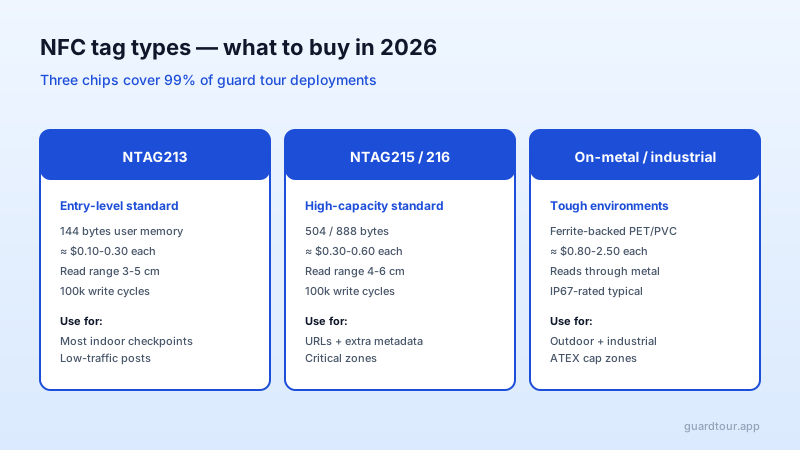
- NTAG213 — the workhorse. 144 bytes of user memory, 100k write cycles, $0.10-0.30 per tag in bulk. Use for most indoor checkpoints in low-traffic posts.
- NTAG215 / NTAG216 — high-capacity standard. 504 or 888 bytes, same read range, $0.30-0.60 per tag. Use when you want to store the checkpoint URL plus metadata (zone, expected frequency, owner).
- On-metal industrial tags — ferrite-backed PET or PVC, IP67-rated, can read through metal surfaces. $0.80-2.50 per tag. Use outdoors, in industrial environments, or for tags mounted on metal cabinets and pipes.
The chip type is invisible to the guard. The platform only sees a UID and the associated checkpoint. The reason to pick the more expensive tag is operational durability (industrial environments) or storage capacity (where the URL needs to encode more context than a checkpoint ID).
NFC vs QR: when each one wins
The most common procurement question is whether to use NFC tokens or printed QR codes. Both produce the same result — a verified checkpoint scan — but with different tradeoffs.
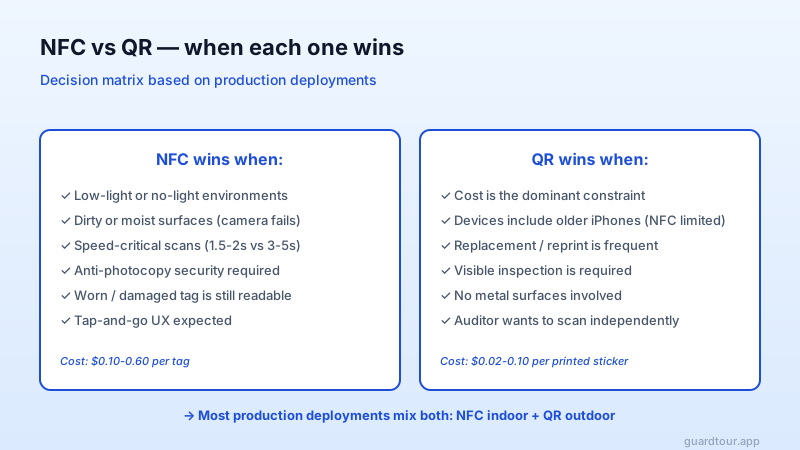
NFC wins when: the environment is dark, dirty, wet, or speed-critical. NFC reads in 1.5-2 seconds regardless of lighting; QR camera scans take 3-5 seconds and fail in low light or with dirty/torn stickers. NFC tags are also harder to clone with a smartphone — you need an NFC writer device and physical access to a blank tag, which is a meaningfully higher bar than printing a duplicate QR with any office printer.
QR wins when: cost is the dominant constraint, the deployment includes older iPhones with limited NFC support (iPhone 6 and earlier), or replacement is frequent. A QR sticker costs $0.02-0.10 in bulk vs $0.10-0.60 for NFC. QR also has the advantage that an auditor with their own phone can scan the same checkpoint independently.
Most production deployments mix both: NFC for indoor checkpoints (where the speed and dirt-resistance matter), QR for outdoor signage and high-replacement-rate areas.
The 6-step deployment checklist
Where most NFC deployments go wrong is in the placement and validation, not the tag choice. Six steps cover every production deployment we have seen succeed:
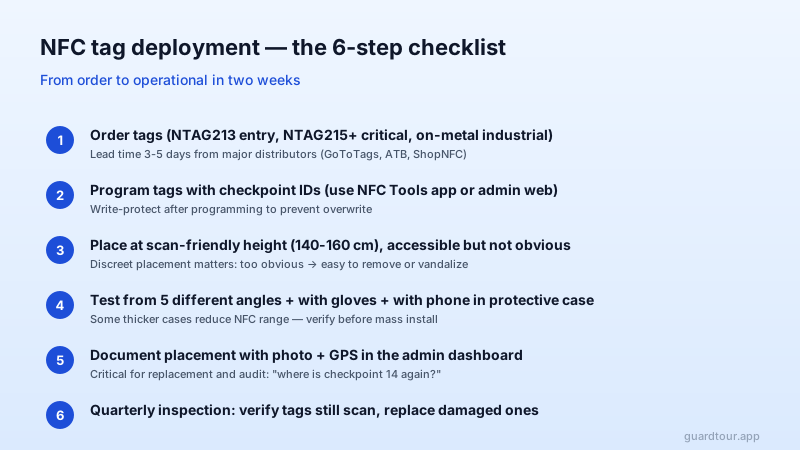
Step 1 — Order tags. Pick the chip type per zone (NTAG213 for low-traffic, NTAG215+ for critical, industrial for outdoor/metal). Major distributors include GoToTags, ATB, ShopNFC. Lead time is 3-5 business days for bulk orders.
Step 2 — Program tags with checkpoint IDs. Use the NFC Tools mobile app or the admin web of your platform. Most platforms support batch programming via NFC writer hardware. Write-protect after programming to prevent the tag from being overwritten in the field.
Step 3 — Place at scan-friendly height. 140-160 cm is the ergonomic sweet spot for most guards — accessible without bending or stretching. Mount discreetly: too-obvious placement invites vandalism or theft of the tags.
Step 4 — Test from 5 angles + with gloves + with phone case. Some thicker phone cases reduce NFC read range. Some thicker work gloves prevent precise positioning. Verify the tag reads in real conditions before committing to a mass install.
Step 5 — Document placement. Take a photo of each tag in situ with GPS coordinates and store in the admin dashboard. This is what enables "where is checkpoint 14 again?" to be answered in seconds during audits and replacements.
Step 6 — Quarterly inspection. Walk the site once a quarter, verify each tag still scans, replace damaged or missing ones. The maintenance cost is real but small: typical replacement rate is 3-5% per year in indoor environments, 10-15% in outdoor or industrial.
Common pitfalls
Three pitfalls show up repeatedly:
- Buying cheap tags from generic marketplace sellers. $0.05/tag from a marketplace listing often arrives with chips that are not NTAG-compatible, fail after 50 writes, or have malformed memory layouts that crash the platform. Stick to reputable distributors.
- Mounting on metal without on-metal tags. A standard NTAG mounted directly on a metal surface will fail to read because the metal detunes the antenna. The fix is on-metal tags with ferrite backing.
- Forgetting to write-protect. Tags shipped writable can be overwritten by anyone with a smartphone and the NFC Tools app. In a hostile environment this is an attack vector.
How guardtour.app handles NFC
guardtour.app reads all standard NFC Type 2 tags (NTAG213/215/216, MIFARE Ultralight) plus on-metal industrial variants. The platform supports both per-tag programming via the mobile app and bulk programming via the admin web with a USB NFC writer. The checkpoint registry stores tag UID, programmed URL, placement photo, GPS, and zone metadata — all queryable via the API for integration with facility management systems.
The free plan includes the full NFC stack with no per-tag licensing. Unlimited controllers, 5 checkpoints, no time limit; public pricing thereafter from $29/month (Pro) to $79/month (Business), billed per checkpoint.
Further reading
- /security-guard-apps — buyer's view of guard apps including NFC support criteria
- /glossary/two-factor-checkpoint — vendor-neutral definition of NFC + GPS combined verification
- /blog/checkpoints-doble-factor-nfc-gps-rondines — Spanish-language deep dive on multi-signal checkpoints