If you run a security operation, you have heard it for years: "I already did the round," with nothing to back it up. Guard tour software is the digital answer. It replaces the paper logbook with an app that captures every step of every patrol with a photo, an exact timestamp and a GPS fix.
Why paper patrols don't scale
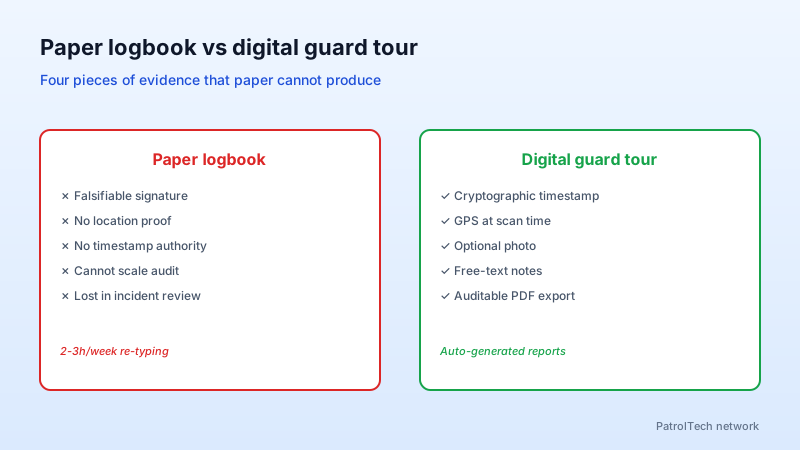
Logbooks are unverifiable. When a client or a court asks for proof, a signed page is meaningless. Ghost rounds — patrols signed but never walked — are a known problem in the industry. And every supervisor loses two or three hours a week re-typing handwritten reports into spreadsheets.
How a digital guard tour actually works
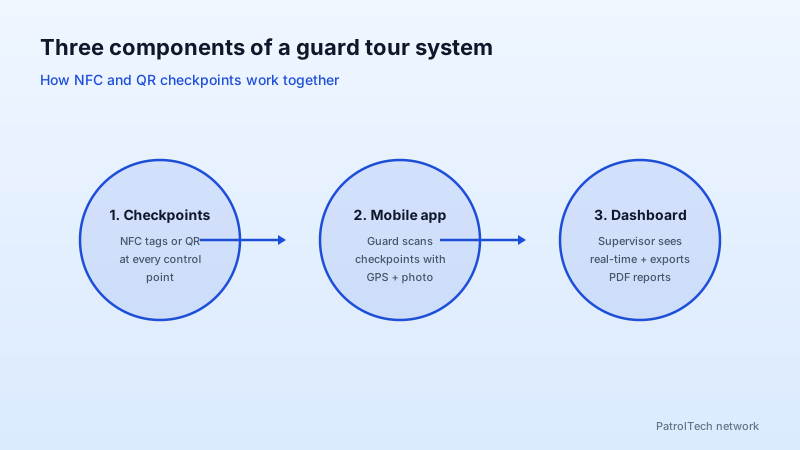
Three components:
- Checkpoints — NFC tags or QR labels glued to every control point (entrance, fire exit, server room, perimeter posts).
- Mobile app — the guard scans each checkpoint as they pass. The app captures timestamp, GPS, optional photo and signature.
- Dashboard — supervisors see in real time which patrols are completed, which raised an incident, and export a PDF report for the client.
The four pieces of evidence your client wants
Each completed patrol generates, automatically:
- Exact timestamp of the checkpoint scan (not the time the guard wrote down).
- GPS location of the device at scan time.
- Optional photo of the point's state (gate, vehicle, locker).
- Signature or free-text note if anything was off.
These four pieces are bundled into a single auditable PDF. Your client stops asking for "the paper" because the report lands in their inbox every Monday.
Works without coverage
Serious guard tour software runs offline. Basements, parking garages, shielded rooms — the guard scans without connectivity and the app syncs the moment it sees Wi-Fi or cellular again. If your current tool needs Wi-Fi at every checkpoint, it won't survive a real shift.
When does it pay off?
Past 3-4 guards or 2 sites you can no longer monitor compliance personally. ROI shows up two ways: you stop paying for avoidable incidents (a break-in on a perimeter that wasn't actually walked), and you stop losing accounts because reports finally hold up.
Get started
Spin up a free account and run digital guard tours on your own checkpoints for 30 days. No credit card, no commitment. If it doesn't fix the problem in a week, close the account.