"Guard tour system software download" is one of the most common searches in this category, and almost nobody who types it wants a marketing page. They want an installer. Usually because a patrol wand arrived in a box with a mini-CD or a link on a slip of paper, and nothing works until the desktop utility is running.
This post explains what that download actually is, the three ways it fails in practice, and what "installing" means for a system that was designed after smartphones existed.
Why a download is part of the question at all
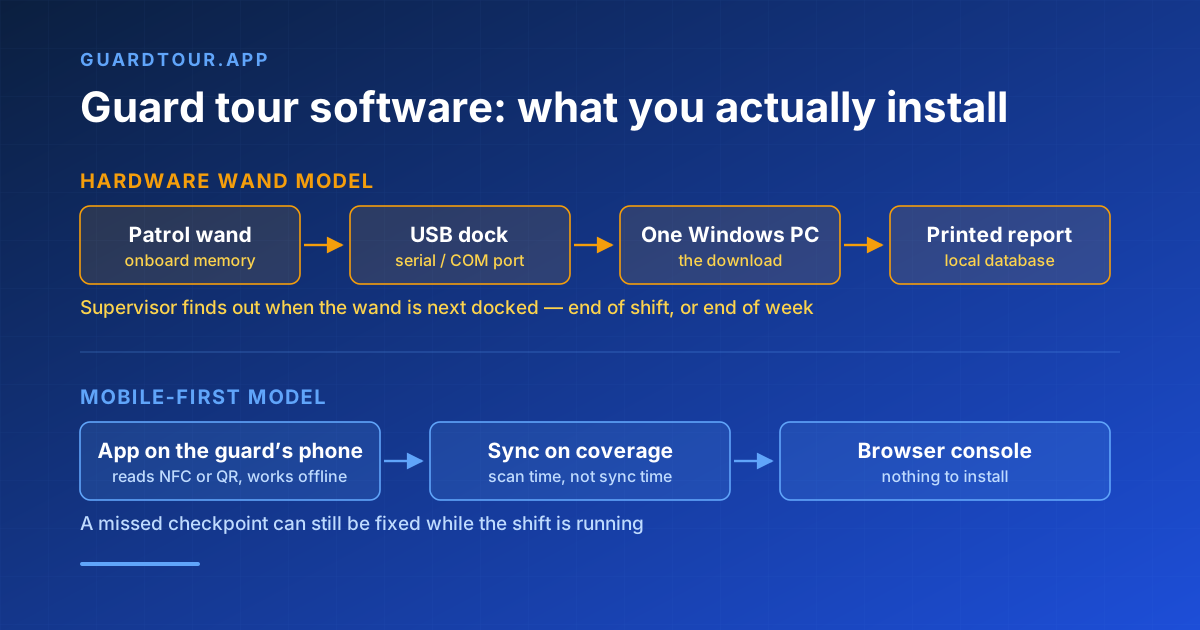
Hardware patrol wands store data locally. The guard walks the site, touches the wand to each iButton or RFID checkpoint, and the timestamps accumulate in onboard memory. The wand has no radio and no screen. The only way to get the data out is to dock it over USB or serial to a PC running the manufacturer's reader utility, which pulls the memory, maps checkpoint IDs to names, and prints a report.
So the download is not an optional extra. It is the only interface the system has. Without it, the wand is a box that beeps.
That architecture explains the shape of the related searches: people also look for the wand model number plus "driver", for the reader utility for a specific COM port, and for the software after the PC it was installed on was replaced.
The three failure modes of the desktop-download model
The PC becomes a single point of failure. The reader utility is typically 32-bit Windows, installed once on one machine, holding the only copy of the patrol history in a local database file. When that PC is retired, reimaged, or dies, the history goes with it unless somebody remembered where the data directory lives. This is the most common way a company discovers it has no audit trail — during an audit.
Data arrives late by design. A wand cannot report an incident. It records that a checkpoint was touched at a given time, and the supervisor learns about it whenever the wand is next docked, which in practice means at the end of a shift or the end of a week. Nothing in the model supports a missed-checkpoint alert while the shift is still running.
Compatibility drifts. Driver signing requirements, USB-to-serial adapters, and Windows major versions all move faster than the utility does. A tool that was fine in 2016 may now need compatibility mode, an unsigned driver exception, or a dedicated old laptop kept alive for this one job.
None of this makes wands useless. They are genuinely good in environments covered later in this post. But the download is a symptom of an architecture, not a feature.
What you install for a mobile-first guard tour system
There is no desktop installer. The full stack is:
- The mobile app, from Google Play or the App Store, on the guard's phone. That is the only thing installed on any device.
- The web console, opened in a browser by supervisors and administrators. Nothing to install, nothing to keep patched on a specific PC.
- The checkpoints, which are passive NFC tags or QR labels stuck to walls, doors, and gates. They contain no battery and no software.
The phone is both the reader and the radio. It reads the tag, stamps the scan with time and location, and syncs when it has a connection. Reports are generated server-side, so they are available to anyone with access rather than to whoever sits at the right desk.
Offline is not the same thing as desktop
The strongest argument people make for the wand-plus-download model is that it works without connectivity. That is true, and it matters: basements, plant rooms, substations, remote yards and ship holds routinely have no signal.
But offline capability and a desktop installer are unrelated. A mobile app can hold a full shift of scans, photos, and incident reports in local storage and reconcile them when the device reaches coverage. The guard sees the scan confirmed immediately; the supervisor sees it when the device syncs. No docking station, no COM port, no single PC.
The question worth asking a vendor is not "does it work offline" — everyone says yes — but what specifically survives a shift with no signal. Scans only, or scans plus photos plus incident forms? What happens if the app is force-closed mid-shift? Is the queue capped? Those answers separate real offline-first from a cache that silently drops data.
When a dedicated reader is still the right call
Being honest about this is more useful than pretending otherwise. A handheld reader beats a phone when:
- Phones are banned on site. Some data centres, defence sites, and pharmaceutical clean areas prohibit camera-equipped devices entirely.
- The environment is hostile to consumer hardware. Sustained sub-zero cold destroys phone batteries; ATEX-classified zones require intrinsically safe equipment that consumer phones are not certified for.
- You do not want to own a phone fleet. If guards have no work device and personal phones are not an option, a pool of rugged wands has a simpler procurement story.
If any of those apply, the desktop download is part of your life, and the thing to negotiate is data export: insist on a documented export format so the history is not trapped in a proprietary local database.
Getting historical data off a wand
If you are migrating, do the export before you decommission the PC, not after. Two practical points:
Most reader utilities can export to CSV or a delimited text file even when the primary output is a formatted report. Find that menu before anything else. And export the checkpoint mapping table separately — the scan log usually stores numeric tag IDs, and without the mapping the history is a list of numbers with no locations attached.
Keep the raw export alongside whatever you import into the new system. Compliance regimes generally care about the original record, not the reformatted one.
What guardtour.app installs
One app on the guard's phone, from the official stores. Checkpoints are NFC tags or QR labels with no power and no firmware. Supervisors use a browser. Scans, photos, and incident reports are captured and stored on the device during a shift with no connection, and reconciled on the server once the device is back in coverage.
There is no Windows utility, no docking station, and no PC that becomes the system of record.
Further reading
- /offline-guard-tour-software — what specifically survives a shift with no connectivity, end to end.
- /blog/nfc-token-for-guard-tour-software — how passive NFC checkpoints work and how they are cloned or spoofed.
- /blog/qr-vs-nfc-vs-bluetooth-beacons-guard-tour-decision-matrix-2026 — choosing checkpoint technology by environment.